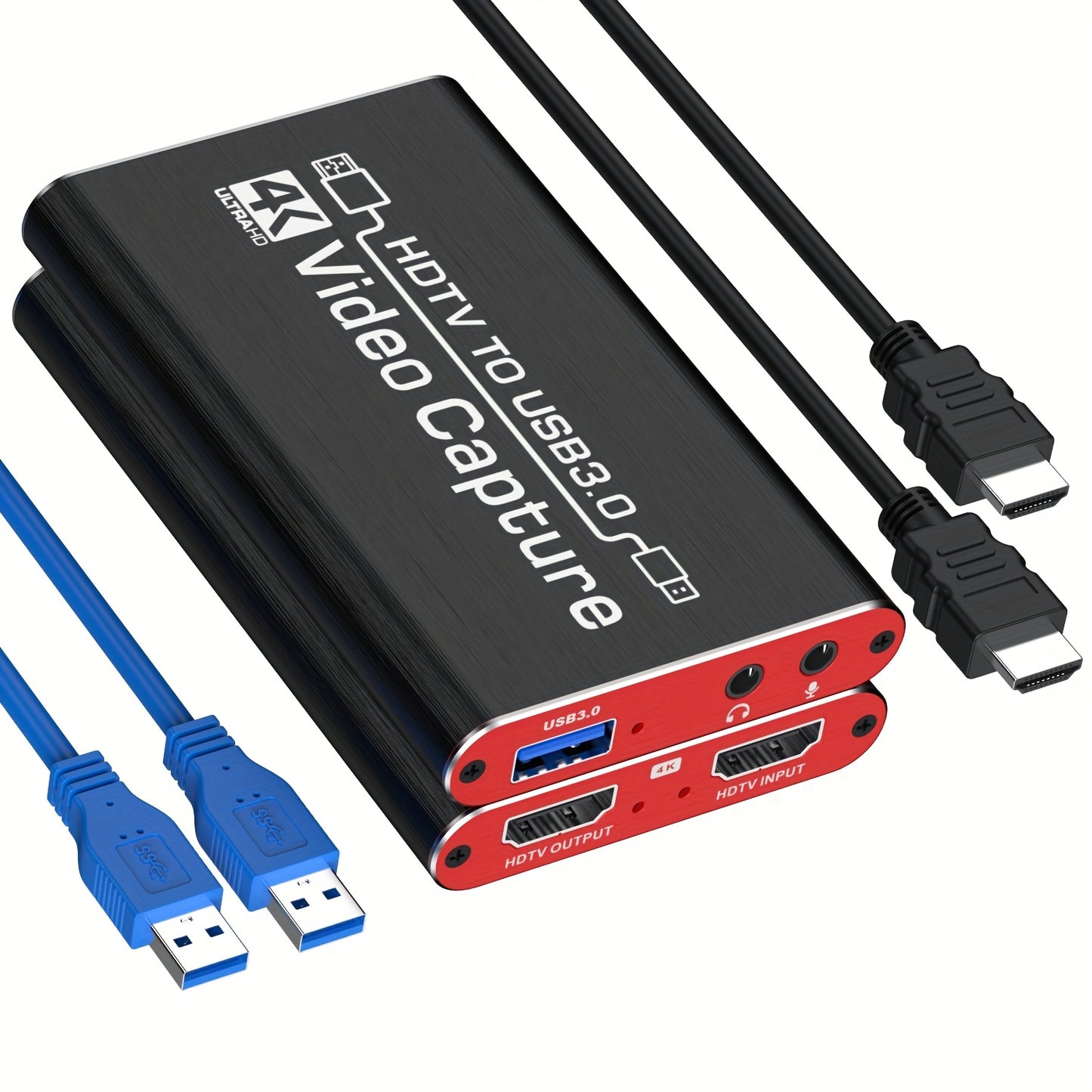
HDMI Capture Card with Microphone & 4K Loop-Out for Streaming – 1080P 60fps USB Video Recorder for Gaming, Live Streaming, Video Conference, Works with Nintendo Switch, PS4, OBS, Camera, PC
HDMI Capture Card with Microphone & 4K Loop-Out for Streaming – 1080P 60fps USB Video Recorder for Gaming, Live Streaming, Video Conference, Works with Nintendo Switch, PS4, OBS, Camera, PC


Couldn't load pickup availability
-
Ordered
- - -
Order Ready
- - -
Delivered

HDMI Capture Card with Microphone & 4K Loop-Out for Streaming – 1080P 60fps USB Video Recorder for Gaming, Live Streaming, Video Conference, Works with Nintendo Switch, PS4, OBS, Camera, PC
HDMI Capture Card with Microphone & 4K Loop-Out – Professional Streaming & Recording
Elevate your streaming and recording setup with this versatile HDMI Capture Card, engineered for content creators, gamers, and professionals. Featuring a high-end smart chip housed in a sleek aluminum alloy shell, this capture card supports up to 4K@60fps HDTV input and delivers crystal-clear 1080P@60fps output via USB 3.0. Whether you're broadcasting on Twitch, recording gameplay on YouTube, or hosting a video conference, this plug-and-play device works instantly with OBS, Nintendo Switch, PS4, cameras, and PC — no drivers needed.
Key Features
- 🎮 4K HDTV Input & 1080P 60fps Output – Capture stunning high-resolution footage with zero frame lag for smooth, professional-quality streams and recordings.
- 🎤 Built-In Microphone Support – Add live commentary or voiceover directly to your stream or recording without extra equipment.
- 🔁 4K HDTV Loop-Out Pass-Through – Continue viewing your game or content on your monitor in full 4K while simultaneously capturing and streaming.
- ⚡ Plug & Play USB 3.0 – No drivers or software installation required. Connect and start streaming instantly on PC or Mac.
- 🎯 Universal Compatibility – Works seamlessly with Nintendo Switch, PS4, Xbox, DSLR cameras, camcorders, OBS Studio, XSplit, and more.
- 🏠 Compact Aluminum Alloy Design – Durable, lightweight, and portable — perfect for home studios, travel setups, and professional broadcast environments.
Specifications
| Specification | Details |
|---|---|
| Video Input | HDMI (up to 4K@60fps) |
| Video Output (Capture) | 1080P@60fps via USB 3.0 |
| Loop-Out Resolution | Up to 4K@30fps HDTV |
| Connection Interface | USB 3.0 |
| Audio | Microphone input supported |
| Compatible Platforms | Nintendo Switch, PS4, Xbox, PC, Mac, Camera |
| Compatible Software | OBS Studio, XSplit, Streamlabs, Zoom, Teams |
| Shell Material | Aluminum Alloy |
| Operating Voltage | Up to 36V via USB |
| Plug & Play | Yes (no drivers required) |
Frequently Asked Questions
Q: Who is this capture card best suited for?
A: This capture card is ideal for gamers, streamers, content creators, vloggers, educators, and remote workers who need reliable, high-quality video capture and live streaming capabilities.
Q: What can I use this capture card for?
A: You can use it for live streaming on Twitch or YouTube, recording gameplay from Nintendo Switch or PS4, hosting video conferences on Zoom or Teams, and capturing footage from cameras or camcorders.
Q: Is this a good gift for a gamer or content creator?
A: Absolutely! This capture card makes an excellent gift for gamers, streamers, and aspiring YouTubers. It's plug-and-play, works with all major consoles, and supports professional streaming software right out of the box.
Q: How do I set up this capture card with OBS Studio?
A: Simply connect the HDMI output of your console or camera to the capture card's HDMI input, then plug the USB 3.0 cable into your PC or Mac. Open OBS Studio, add a Video Capture Device source, and select the capture card. Note: restart OBS after completing audio settings to ensure sound output works correctly.
Q: What accessories do I need to use this capture card?
A: You'll need an HDMI cable (to connect your source device), a USB 3.0 cable (included or standard), and a PC or Mac running OBS or similar software. A microphone or audio output device is optional for enhanced audio capture.
Q: Does this capture card have STEM or educational applications?
A: Yes! This device is great for STEM education — students and educators can use it to capture microscope feeds, document experiments, record tutorials, or stream science demonstrations live, making it a versatile tool for modern classrooms and maker spaces.
Fast US Shipping
Ships from US warehouse, free delivery 2-7 business days.