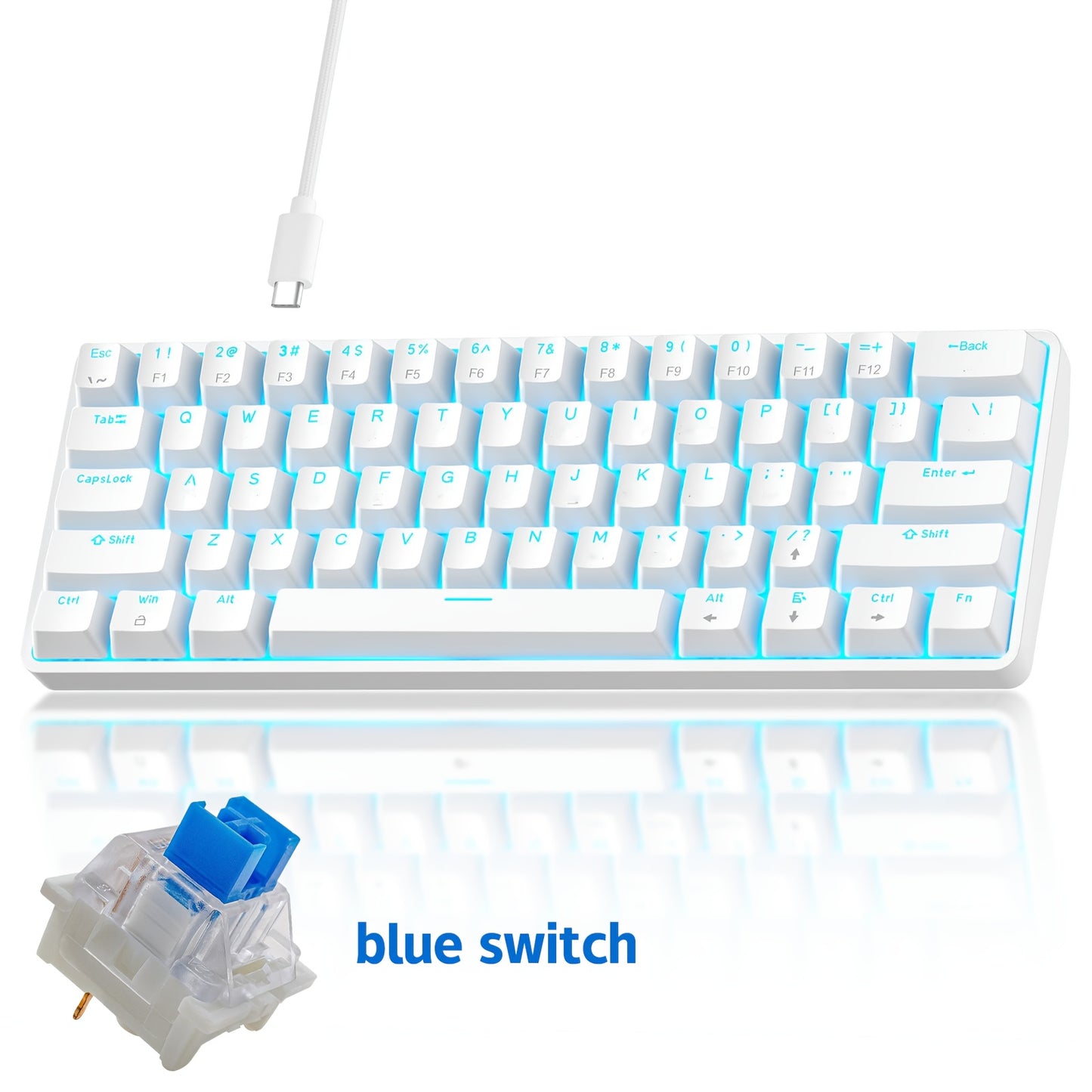
Hot-Swap 61-Key 60% RGB Mechanical Gaming Keyboard, Hot Swappable Red Blue Switch Compact Wired Keyboard with RGB Backlight, Portable Mini Keyboard for Windows PC Laptop Mac Gamers Typists
Hot-Swap 61-Key 60% RGB Mechanical Gaming Keyboard, Hot Swappable Red Blue Switch Compact Wired Keyboard with RGB Backlight, Portable Mini Keyboard for Windows PC Laptop Mac Gamers Typists


Couldn't load pickup availability
-
Ordered
- - -
Order Ready
- - -
Delivered

Hot-Swap 61-Key 60% RGB Mechanical Gaming Keyboard, Hot Swappable Red Blue Switch Compact Wired Keyboard with RGB Backlight, Portable Mini Keyboard for Windows PC Laptop Mac Gamers Typists
Hot-Swap 61-Key 60% RGB Mechanical Gaming Keyboard — Customize Your Switches, Elevate Your Game
The Smart Tech Nest Hot-Swap 61-Key 60% Mechanical Gaming Keyboard gives you the freedom to swap switches without soldering — choose your preferred Red (linear, smooth) or Blue (clicky, tactile) switches and change them anytime. With a compact 60% layout, full RGB backlighting, and a durable wired USB connection, this keyboard is built for gamers, typists, students, and desk setup enthusiasts who want premium feel without the premium price.
Why You'll Love It
- 🔄 Hot-Swappable Switches — Swap Red or Blue switches in seconds, no soldering required; fully customize your typing feel
- 🎮 60% Compact Layout (61 Keys) — Saves desk space, perfect for gaming setups, travel, and minimalist workstations
- 🌈 Full RGB Backlight — Vibrant per-key RGB lighting with multiple lighting effects to match your setup aesthetic
- ⚡ Wired USB Connection — Reliable, lag-free connection for competitive gaming and everyday typing
- 🖥️ Wide Compatibility — Works with Windows, Mac, Linux, PC, and laptop; plug-and-play, no drivers needed
- 🎨 Multiple Color Options — Available in Black/Red, White/Black, White/Blue, White/Red, and more to match your style
- 💪 Durable Build — Sturdy keycaps and solid construction designed for long-term daily use
- 🎒 Ultra-Portable — Lightweight and compact enough to toss in a backpack for gaming on the go
Specifications
| Feature | Details |
|---|---|
| Layout | 60% (61 Keys) |
| Switch Type | Hot-Swappable Red Switch / Blue Switch (Cyan Axis) |
| Backlight | Full RGB |
| Connection | Wired USB |
| Compatibility | Windows, Mac, Linux, PC, Laptop |
| Color Options | Black/Red, White/Black, White/Blue, White/Red, Black/Blue, Black-White Spell |
| Form Factor | Compact / Tenkeyless (TKL 60%) |
| Plug & Play | Yes — no drivers required |
Frequently Asked Questions
Q1: Who is this keyboard best suited for?
A: This keyboard is ideal for PC gamers, competitive esports players, students, programmers, and anyone who wants a compact, customizable mechanical keyboard for gaming or everyday typing. It's also great for minimalist desk setups and travel use.
Q2: What's the difference between Red and Blue switches?
A: Red switches are linear and smooth — quiet and fast, preferred by gamers. Blue switches are clicky and tactile — they produce an audible click with each keystroke, preferred by typists who enjoy feedback. With hot-swap support, you can try both and switch anytime.
Q3: Is this a good gift for a gamer or PC enthusiast?
A: Absolutely. This keyboard makes an excellent gift for gamers, PC builders, students, and tech enthusiasts. It's a great choice for birthdays, holidays, back-to-school, and graduation gifts — especially for anyone building their first mechanical keyboard setup.
Q4: How do I swap the switches?
A: Use a switch puller (not included) to pull out any switch from the hot-swap socket, then press a new compatible switch straight in until it clicks into place. No soldering, no tools beyond the puller needed.
Q5: What accessories are compatible with this keyboard?
A: Standard MX-compatible switches and keycaps are compatible. You can customize with aftermarket keycap sets, wrist rests, and switch pullers. The USB cable is standard and can be replaced with any compatible USB cable.
Q6: Does this keyboard have STEM or educational value?
A: Yes! Hot-swappable keyboards are a great hands-on introduction to mechanical keyboard technology, switch mechanics, and electronics customization — making this a fun STEM project for students and young makers interested in hardware and computer peripherals.
Fast US Shipping
Ships from US warehouse, free delivery 2-7 business days.