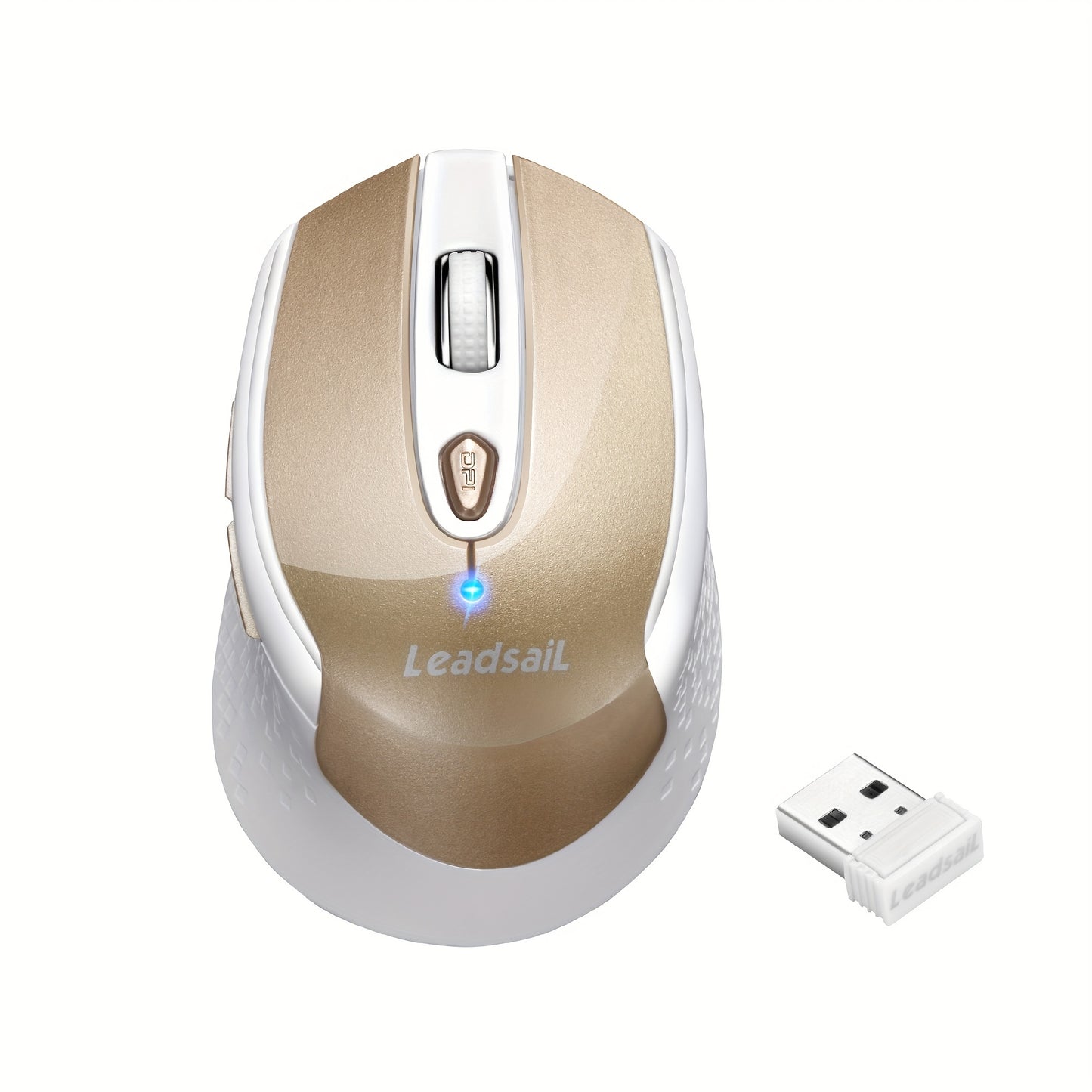
Wireless Ergonomic Mouse 2.4G USB – 6 Buttons, 3-Gear DPI 1200/1400/1600, Left-Side Shortcut Keys, Plug & Play for PC, Mac, Laptop, Office & Home | Dark Blue, Light Blue, Gold
Wireless Ergonomic Mouse 2.4G USB – 6 Buttons, 3-Gear DPI 1200/1400/1600, Left-Side Shortcut Keys, Plug & Play for PC, Mac, Laptop, Office & Home | Dark Blue, Light Blue, Gold


Couldn't load pickup availability
-
Ordered
- - -
Order Ready
- - -
Delivered

Wireless Ergonomic Mouse 2.4G USB – 6 Buttons, 3-Gear DPI 1200/1400/1600, Left-Side Shortcut Keys, Plug & Play for PC, Mac, Laptop, Office & Home | Dark Blue, Light Blue, Gold
Wireless Ergonomic Mouse – 2.4G USB, 6 Buttons & 3-Gear DPI for Office, Home & Laptop Use
Upgrade your daily computing experience with this wireless ergonomic mouse – designed for comfort, precision, and productivity. Featuring a reliable 2.4GHz wireless connection via USB receiver, 6 programmable buttons including left-side shortcut keys, and three adjustable DPI settings (1200/1400/1600), this mouse adapts to your workflow whether you're browsing, working in spreadsheets, editing documents, or casual gaming. Simply plug in the USB receiver and go – no software required. Available in Dark Blue, Light Blue, and Gold.
Why You'll Love This Wireless Mouse
- 📡 2.4GHz Wireless Connection – Stable, lag-free signal up to 33 feet via compact USB receiver – plug and play instantly
- 🔲 3-Gear DPI Switching – Switch between 1200, 1400, and 1600 DPI on the fly for precision or speed
- 🖖 6 Buttons with Left-Side Shortcuts – Left-side shortcut keys for back/forward navigation – boost your browsing and workflow efficiency
- 🤝 Ergonomic Design – Contoured shape reduces hand and wrist fatigue during long work sessions
- ⚡ Plug & Play – No drivers or software needed – insert the USB receiver and start working immediately
- 💻 Universal Compatibility – Works with PC, Mac, Windows, macOS, and most laptops with a USB port
- 🎨 3 Color Options – Dark Blue, Light Blue, and Gold to match your desk setup
Specifications
| Feature | Details |
|---|---|
| Connection | 2.4GHz Wireless (USB Receiver) |
| Buttons | 6 (including left-side shortcut keys) |
| DPI Settings | 1200 / 1400 / 1600 (3-gear switchable) |
| Interface | USB (Plug & Play) |
| Design | Ergonomic |
| Color Options | Dark Blue, Light Blue, Gold |
| Compatibility | PC, Mac, Windows, macOS, Laptop |
| Wireless Range | Up to ~33 ft (10m) |
Frequently Asked Questions
Q: Who is this wireless mouse best suited for?
A: This mouse is ideal for office workers, students, remote workers, and everyday computer users who want a comfortable, reliable wireless mouse with extra shortcut buttons for faster navigation. It's also a great entry-level option for casual gamers.
Q: What do the left-side shortcut keys do?
A: The two left-side shortcut keys function as browser back and forward buttons by default, allowing you to navigate web pages and file folders faster without reaching for the keyboard. They significantly speed up everyday browsing and file management.
Q: Is this a good gift for students or office workers?
A: Yes – this wireless ergonomic mouse is a practical and affordable gift for students, remote workers, and anyone upgrading their desk setup. It ships fast from our US warehouse – perfect for birthdays, back to school, or Christmas.
Q: How do I connect this mouse to my computer?
A: Simply plug the included 2.4GHz USB receiver into any available USB port on your PC, Mac, or laptop. The mouse connects automatically – no drivers or software installation required.
Q: How do I switch DPI settings?
A: Press the DPI button on the mouse to cycle through the three sensitivity levels: 1200 DPI (precise, slow), 1400 DPI (balanced), and 1600 DPI (fast, wide movements). Choose the setting that best matches your task.
Q: Is this mouse suitable for STEM or educational use?
A: Yes – the plug-and-play USB connection and ergonomic design make this mouse an excellent tool for students in computer science, coding, or design classes. The adjustable DPI is also useful for precision tasks like CAD or digital art.
Fast US Shipping
Ships from our US warehouse. Enjoy free delivery in 2–7 business days – no import delays, no customs fees. Order today and get it fast!